 Spovex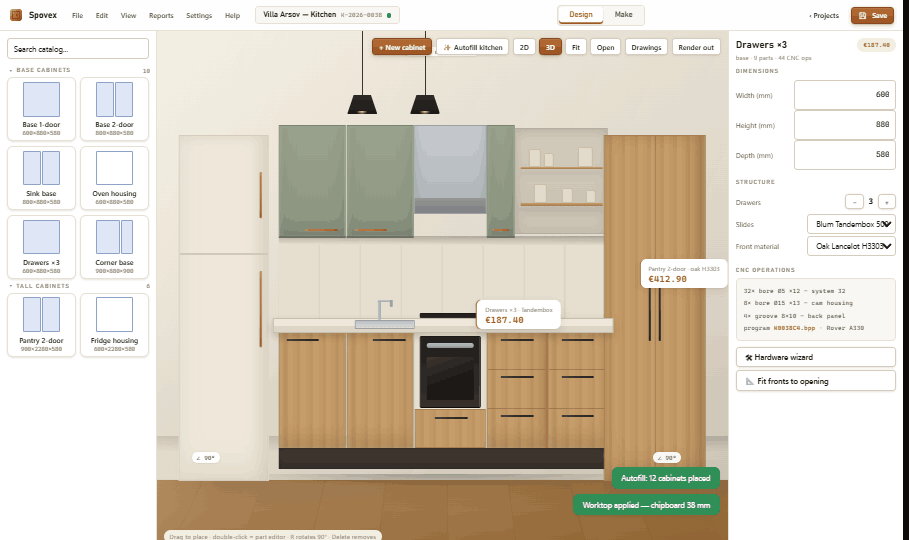
Cabinet software now covers several very different jobs. One application may be excellent for presenting a kitchen to a client. Another may specialize in fitting rectangles onto sheets. A third may engineer every drilling and produce machine-ready code. A fourth may manage orders, workers and costs but draw no cabinets at all. Calling all four “cabinet software” is convenient, yet it makes buying the right system unnecessarily difficult.
This guide compares Mozaik, CABINET VISION, PolyBoard, SketchList 3D, MaxCut, PRO100 and Spovex on the boundaries that matter in a working shop: design, cutting optimization, CAM and CNC output, ERP coverage, deployment model and price class. It is not a laboratory ranking and it is not an attempt to make every product look interchangeable. Each has a sensible audience. The purpose is to help you build a shortlist around your production method instead of buying an impressive demo that stops one step before your actual bottleneck.
The short answer: choose the complete path you need
If you primarily create client visuals and workshop drawings, begin with design quality, cabinet editing and reporting. If you cut panels on a manual or beam saw, evaluate the optimizer as its own discipline: kerf, trim, grain, offcuts, labels and operator-readable patterns matter more than a beautiful 3D view. If you run CNC equipment, the post processor and proven compatibility with your exact controller are purchase gates, not optional extras. If the company also needs production tracking, attendance and finance, ask whether ERP is truly inside the product, merely connected by an export, or sold as another system.
That distinction immediately narrows the field. MaxCut is a specialist optimizer rather than a room-design-to-CNC platform. SketchList is approachable woodworking design software with cut layouts and DXF export, but it does not bundle machine G-code generation. Mozaik and CABINET VISION cover much deeper design-to-manufacturing routes. PolyBoard is a perpetual, rule-driven furniture design system with CNC options, while optimization is handled by separate OptiCut or OptiNest products. PRO100 starts as design and visualization software and can be extended toward CNC, with an important CAM boundary to verify. Spovex is positioned as one local Windows workflow from design and rendering through documents, optimization and machine drivers; its published Business launch scope adds a local ERP. It sells directly on spovex.com with a public checkout.
Six questions to answer before comparing brands
1. What must the design model know?
A generic 3D model can show a convincing kitchen without knowing how it will be built. Manufacturing-aware software needs cabinet rules: panel thicknesses, construction methods, joints, fronts, hardware, clearances, edging and machining. Change a cabinet width in a good parametric workflow and the connected parts, drillings, quantities and cost should update together. During a trial, do not only draw a standard base. Resize a corner, change the front arrangement, swap hardware and inspect what changes downstream.
2. Do you need cutting diagrams or a production optimizer?
“Optimization” can mean a simple material-layout diagram or a production tool configured around stock sizes, blade kerf, trim allowances, grain direction, reusable offcuts, labels and the cutting method. A small shop may be well served by clear layouts. A panel saw operation may need machine formats and strict guillotine sequences. A nested router needs true-shape nesting and toolpath logic. Read how panel cutting optimization saves material for a deeper look at the data and shop habits behind useful results.
3. Where does CAD end and CAM begin?
DXF is geometry, not automatically a safe machine program. CAM applies tools, feeds, depths, lead-ins, nesting and controller-specific output. Some cabinet packages generate machine-ready code through included or configured posts. Others export DXF to external CAM. Both models can work, but the second adds another software purchase and another handoff. Ask the vendor to process one of your jobs for your exact machine—not just the same brand—and confirm both face and edge operations. Our guide to the 3D kitchen design-to-CNC workflow explains why this proof matters.
4. Is “ERP” built in, exported to or sold separately?
Quoting and job costing do not automatically equal ERP. A practical furniture ERP may cover orders, production stages, workers, attendance, expenses and finance. An “ERP export” can still be valuable: it sends bills of material or other job data to an external management system. But it is a connection boundary, not a built-in ERP. Ask who owns the production record after export, whether updates return to the design system, and how two versions of the same job are prevented.
5. What must work without the internet?
“Desktop” and “local” are not identical promises. A program can run on a PC while subscriptions, activation, content or collaboration depend on online services. Decide what must continue during an outage: opening jobs, editing designs, generating cutlists, producing CNC files, printing labels and viewing production records. Then get those answers in writing. For shops with strict data policies, also ask where project files, backups and employee records live.
6. What is the real first-year cost?
The visible license is only one line. Add required modules, a second seat, post-processor configuration, CAM, optimizer, rendering, training, maintenance and migration. Then include internal setup time: building material libraries, cabinet standards, hardware rules, reports and machine tooling. A lower purchase price may still be the expensive choice if two employees spend months rebuilding the workflow. A higher-priced system may be economical if it removes repeated entry and has a proven post for your machine.
2026 cabinet software comparison at a glance
| Product | Public price class | Design and optimization | CAM/CNC boundary | ERP and deployment boundary | Practical fit |
|---|---|---|---|---|---|
| Mozaik | Region-dependent subscription; locale checked showed €95 / €195 / €295 monthly on a 12-month term | Cabinet and room design; cutlists; higher editions add nesting and production controls | CNC edition advertises nesting and machine-ready G-code | Desktop product; built-in ERP not advertised on reviewed pages | Shops wanting a mature subscription path from design to CNC |
| CABINET VISION | Quote-based, modular; no exact public license price found | Design, rendering, costing and material optimization through modules | Screen-to-Machine path for machine-ready output | Desktop manufacturing stack; confirm network and offline topology. Built-in ERP not advertised; WORKPLAN is separate | Established manufacturers needing configurable engineering and machine depth |
| PolyBoard | €2,445 Pro; €4,695 CNC-enabled Pro PP in the EU store checked | Rule-driven furniture design; OptiCut and OptiNest are separate products | Pro PP adds post-processor capability and CNC output | Desktop, perpetual license; exports configurable data to an external ERP rather than including one | Furniture makers preferring perpetual design-to-manufacture software |
| SketchList 3D | $599.99/year or $999.99 one-time | Woodworking design, reports and material-layout diagrams | DXF for CNC importing; bundled G-code generation is not advertised | Downloaded desktop application; built-in ERP not advertised. Confirm activation and offline needs | Woodworkers prioritizing accessible design and documentation |
| MaxCut | Community free; Business $200/year | Specialist cutlist, optimization and costing workflow | Not a full cabinet CAD-to-CNC platform | Desktop optimizer; built-in ERP not advertised. Confirm subscription and offline needs | Shops that already have part data and need an affordable optimizer |
| PRO100 | $2,549.99 base; about $5,300 for reviewed design-and-CNC package | Room and cabinet design, visualization, cutlists and costing | CNC route can export machine formats/DXF; vendor says external CAM may still be required for G-code | Windows, perpetual base license; built-in ERP not advertised. Confirm the complete local CNC chain | Design-led shops that will verify the exact CNC chain before buying |
| Spovex | €39 / €79 / €129 monthly; €1,990 Lifetime Pro plus €990 ERP add-on | Cabinet and room design, rendering, documents; Pro adds cutting optimization | Pro adds Biesse-, Selco- and Homag-class machine-driver workflows; compatibility must be confirmed | Published Business scope: built-in ERP designed for the customer's PC; availability confirmed individually | Shops seeking one local design-to-production workflow; public checkout |
How to read the deployment column: these products all have desktop or workstation workflows, but that does not prove identical offline behavior. The reviewed pages did not consistently document activation checks, online content, network databases and backup locations. Spovex explicitly defines its Business ERP as local to the customer’s PC; for every other product, ask which functions keep working during an internet outage and where each category of data is stored.
Product-by-product: where each option makes sense
Mozaik: a subscription ladder from non-CNC work to advanced production
Mozaik’s official product comparison separates Manufacturing, CNC and Enterprise. The regional storefront checked for this guide displayed €95, €195 and €295 per month respectively on a 12-month term; pricing is region-dependent, so your page may show another currency. Manufacturing targets table-saw shops with layout, 3D, cabinet editing, cutlists, pricing and reporting. CNC adds true-shape nesting, machining and machine-ready G-code. Enterprise adds controls for larger operations, including user administration, job dashboards, optimizer runs and wider machine support.
This makes Mozaik relatively easy to shortlist by production level. The tradeoff is the continuing subscription and the need to check which production convenience belongs to which edition or add-on. We did not find a currently offered perpetual license on the reviewed official pages. Nor did those pages advertise a built-in furniture ERP covering attendance and finance. Enterprise job management is useful, but buyers should not assume that the word “Enterprise” means a full ERP. Mozaik is a strong candidate when a shop wants an established cabinet-specific desktop workflow and accepts subscription licensing.
CABINET VISION: modular depth for engineered manufacturing
Hexagon describes CABINET VISION as a modular design-to-manufacturing package. Its official materials cover room and cabinet design, renderings, costing, material optimization and machine output through the Screen-to-Machine ecosystem. That modularity is valuable for established manufacturers: the stack can be configured around engineering, bidding and the machines in use instead of treating every shop as identical.
The same modularity makes internet price comparisons unreliable. Hexagon directs buyers to sales; we found no exact current public license figure to reproduce. Ask for a written bill of materials for the software itself: core product, design, bidding, optimization, S2M, posts, training, maintenance and each seat. A company-management requirement should be scoped separately. Built-in ERP was not advertised on the CABINET VISION pages reviewed, while Hexagon markets WORKPLAN separately for manufacturing project management. CABINET VISION belongs on the shortlist when engineering and machine integration justify a consultative, module-based purchase.
PolyBoard: perpetual parametric furniture design, with separate optimization choices
Wood Designer’s official PolyBoard store offered PolyBoard Pro at €2,445 and the CNC-enabled Pro PP at €4,695 in the EU storefront checked for this article. PolyBoard’s strength is rule-driven furniture construction: manufacturing methods can govern how cabinets and parts respond to changes, and the Pro PP edition adds CNC post-processing capability. This is attractive to furniture makers who prefer a one-time software purchase and are prepared to configure their manufacturing rules.
Do not treat the higher PolyBoard price as an all-inclusive optimization suite. Wood Designer presents OptiCut and OptiNest as separate products, integrated with PolyBoard for saw optimization and nesting. Budget the relevant optimizer as part of the production configuration. The ERP boundary is also explicit: PolyBoard’s ERP export produces a configurable quantitative file that can link to a professional external ERP. That is useful interoperability, not a built-in management system.
SketchList 3D: accessible woodworking design with a deliberate CNC handoff
SketchList’s official pricing page listed $599.99 billed annually or $999.99 for a one-time license, alongside shorter subscription options. It combines woodworking-oriented 3D design with cutlists, purchase reports, rendering and optimized material-layout diagrams. That can be a good fit for custom furniture builders and smaller shops that want to move from sketches or generic modeling into board-aware documentation without buying a factory-scale platform.
The CNC wording deserves care. The official feature list advertises “DXF for CNC importing.” That is a valuable bridge, but DXF is not bundled G-code. Plan on a downstream CAM process unless your machine workflow explicitly accepts one of the outputs supplied. No built-in ERP was advertised on the pages reviewed. SketchList should be judged on how quickly it produces the designs, cut information and reports you need—not penalized for declining to be an all-in-one factory system.
MaxCut: a focused optimizer at a low entry cost
MaxCut publishes a free Community edition and a $200-per-year Business edition ($20 monthly was also listed). Its center of gravity is cutting: part and stock data, material settings, layout diagrams, costing and workshop paperwork. Business adds capacity for more complex jobs, libraries, batch reports and deeper cost calculations. If your current design or spreadsheet already produces trustworthy part dimensions, this narrow focus can be an advantage.
MaxCut should not be compared as though it were a complete parametric kitchen designer, photoreal renderer and CNC CAM suite. It solves a different problem. A shop that likes its current CAD but wastes time laying out boards may get more value from a specialist optimizer than from replacing the whole design system. Conversely, a shop trying to eliminate data re-entry must test how part names, grain, edging and quantities move into MaxCut, and what returns to the rest of production. Built-in ERP was not advertised on the official pages reviewed.
PRO100: design and presentation first, with a CNC configuration to verify carefully
PRO100’s public pricing page listed the base perpetual product at $2,549.99 and said CNC pricing was not included there. Its official CNC cabinet page described the complete design-and-CNC package at approximately $5,300. PRO100 offers room and cabinet design, visualization, cutlists, costing and catalog workflows, so it can appeal to sales-led and custom shops that want a perpetual design tool.
The same CNC page makes an unusually helpful qualification: the CNC version does not include CAM for nesting or generating generic G-code out of the box, although it can export DXF and several machine-specific formats. It recommends an external CAM route where necessary. That does not make the workflow bad; it makes machine proof essential. Give the vendor your make, model, controller, units, tool table and representative part operations, then request a complete sample output. A built-in ERP was not advertised on the reviewed pages.
Spovex: one local path, with public pricing
Spovex starts at €39/month or €390/year for Starter, which includes design, rendering, quotes, cutlists and labels. Pro is €79/month or €790/year and adds cutting optimization plus Biesse-, Selco- and Homag-class machine-driver workflows; exact compatibility must be confirmed. Business is €129/month or €1,290/year. Its published launch scope adds ERP for production, workers, attendance terminals and finance, designed to run locally on the customer's PC rather than as a customer cloud ERP.
A Lifetime Pro license is €1,990 one-time. The €990 one-time add-on covers the published Business ERP scope. See the exact Spovex module scope and plan comparison before evaluating it against another product.
The honest technical boundary is important: machine support is configuration-specific; “Biesse-, Selco- and Homag-class” is not a guarantee for every controller or machine. Request a compatibility check and test output before production. Spovex belongs on the shortlist for a workshop seeking a self-contained local workflow willing to evaluate it on its own jobs.
Which price class fits which workshop?
Designer, maker or one-person custom shop
Start with the time from measurement to approved drawing, then test the cutlist. SketchList and PRO100 may fit design-led work where approachable modeling and presentation matter. PolyBoard can suit makers who want construction rules and perpetual ownership. Spovex Starter targets the same broad stage with rendering, quotes, cutlists and labels. Do not pay for CNC solely because you might buy a machine someday; do preserve a clean upgrade path so today’s libraries are not discarded later.
Table-saw or panel-saw shop
Prioritize accurate part data, grain, edging, kerf, trim and readable cutting sequences. MaxCut is the low-cost specialist candidate. Mozaik Manufacturing includes non-CNC design-to-manufacture tools, while separate OptiCut can extend a PolyBoard workflow. Spovex Pro combines design with its optimizer and machine-driver tier. Run the same completed project through each candidate and compare required full sheets, usable remnants, number of cuts and operator clarity—never just the displayed waste percentage.
CNC cabinet manufacturer
Shortlist by proven machine output before interface preference. Mozaik CNC, a configured CABINET VISION/S2M system, PolyBoard Pro PP, a verified PRO100 chain and Spovex Pro occupy different price and integration classes, but all must pass the same test: your real cabinet, your exact controller and your operations. Include blind drillings, edge drillings, pockets, grooves, mirrored parts and labels. Confirm who owns and maintains the post when the machine or software changes.
Manufacturer needing production and company management
Separate job dashboards from ERP requirements. Write down the records you need: orders, production status, worker tasks, attendance terminals, expenses and finance. The published Spovex Business launch scope includes those areas in a local ERP. CABINET VISION can sit in a broader Hexagon environment where WORKPLAN is a separate management product. PolyBoard can export data to an external ERP. For Mozaik, SketchList, MaxCut and PRO100, the reviewed pages did not advertise a built-in ERP, so ask vendors about supported exports, APIs and partners instead of assuming the design database is the management system.
A fair two-job evaluation beats a long demo
Prepare two test projects before speaking to sales. The first should be a common profitable job that represents most of your week. The second should contain the awkward conditions that break workflows: angled walls, a non-standard cabinet width, mixed materials, grain-sensitive fronts, custom drilling and a last-minute client change. Give every vendor the same inputs and require the same outputs.
- Build or import the room. Time the process and note every dimension entered twice.
- Create the cabinet rules. Change width, fronts, shelves and hardware; inspect the resulting parts and drillings.
- Produce the commercial documents. Check the quote, material quantities and whether price changes update consistently.
- Optimize the panels. Use your stock, kerf, trims and grain. Inspect layouts rather than trusting one efficiency number.
- Generate labels and machine output. Trace one part from the drawing to the label, pattern and CNC file.
- Revise the approved job. Make a realistic client change and see which downstream outputs become stale.
- Test recovery. Close, reopen, back up and restore the job. Confirm what happens without internet access.
Score the systems on errors prevented, handoffs removed and operator confidence—not the number of toolbar icons. Also record vendor response time and the quality of the answer when something fails. Training and post support are part of the production system. A machine-stopping issue answered in an hour is very different from the same issue answered next week.
Calculate three-year cost without pretending every license is equivalent
For subscriptions, multiply the actual contracted monthly charge by the term and seats, then add setup, add-ons and any separate CAM or ERP. For perpetual products, add maintenance you expect to keep, major upgrades, machine posts and the same setup items. Do not compare €79 per month with a €4,695 perpetual package by dividing one number by another and stopping there: edition scope, optimizer, CNC, training and management boundaries differ.
Then estimate the cost of your current handoffs. Count monthly hours spent retyping parts, rebuilding nesting data, correcting labels, recreating CNC operations or reconciling production records. Add the expected cost of one spoiled sheet or machine collision, but keep estimates conservative. Good software should earn its place through repeatable time, material or risk reduction. If the business case only works with heroic savings promised by a sales presentation, it is not ready.
There is no universal winner—and that is useful
Mozaik offers a clear subscription progression for cabinet shops moving from design and cutlists into CNC and larger production controls. CABINET VISION is the consultative, modular candidate for manufacturers that need deep engineering and machine configuration. PolyBoard combines parametric furniture design and perpetual licensing, with optimization and ERP treated as connected but separate concerns. SketchList makes woodworking design and documentation accessible. MaxCut focuses budget on optimization. PRO100 emphasizes design and visualization with a CNC path that must be scoped around CAM. Spovex aims to keep design and production outputs in one local product, with a local ERP in its published Business launch scope and approved public prices. Access, current module availability and machine confirmation are currently handled directly.
Your winner is the system that completes your two test jobs with the least ambiguity at the boundaries. Start with where your data is retyped today. Decide how far one product must carry it. Then demand evidence on your machine and your documents before signing a term or migrating a library.